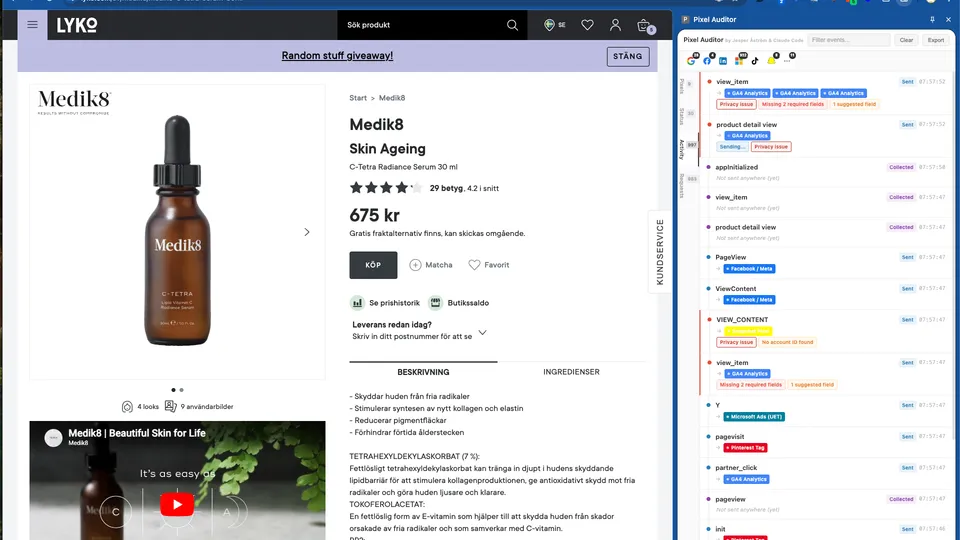
What you get
Pixels
Every tracking vendor detected on your site — GA4, Meta, LinkedIn, Google Ads, TikTok, Snapchat, Microsoft, Pinterest, Shopify. See account/property IDs with click-to-copy. Expandable view showing which pages each pixel fired on and how many times.
Status
At-a-glance health overview of all vendors. Event counts, page counts, and issue status. Google Consent Mode status. Expandable issue details per vendor. "Copy & Debug with AI" button that opens Claude AI for step-by-step fix instructions.
Activity
Unified timeline of all events in chronological order. See both dataLayer events and network requests in the same card. Flow matching links a dataLayer push to the network requests it triggered — the full journey from collection to delivery.
Requests
Raw network request view grouped by vendor and account ID. Full parameter decode with human-readable labels. GA4 e-commerce validation against official schemas. PII detection flags plaintext emails, phone numbers, and unhashed personal data.
Built for marketers and analysts
Search & Filter
Real-time search across all tabs — event names, request URLs, parameter values. Vendor filter bar with logo icons and badge counts. Click to isolate any vendor instantly.
Data Persistence
All captured data persists as you browse page to page. Nothing disappears when you navigate. Build up a complete picture of your entire site. Data clears only when you click Clear.
Diagnostics & Validation
PII detection scans every request for plaintext emails and phone numbers. GA4 schema validation checks 17 standard e-commerce events. Consent Mode decoding. Request status tracking. Missing account ID warnings.
AI-Powered Debugging
"Ask AI to review" buttons throughout the extension. Copies event data and opens Claude AI with your tracking data pre-loaded for analysis. Get step-by-step fix instructions for any issue.
DataLayer Interception
Captures all dataLayer.push() events including GTM and gtag() calls. Handles Arguments objects from gtag(). Polling fallback catches events even after GTM overwrites the push method.
Export
Copy all captured data as JSON to your clipboard before clearing. Perfect for sharing with developers or building documentation of your tracking setup.
Supported Vendors
Start debugging your pixels
Free to use. No account required.
Add to ChromeBuilt by Jesper Astrom & Claude Code (Opus 4.6)